
Monitoring usage and credit consumption
The Usage dashboard provides detailed analytics on credit consumption, helping you understand how your team uses Andri and manage your subscription effectively.
Before you begin: Everyone can open the Usage dashboard. Admins see firm-wide statistics, while members and support-role users see only their own credit usage.
Accessing the Usage dashboard
Click Company in the top navigation, then select Usage from the left sidebar.
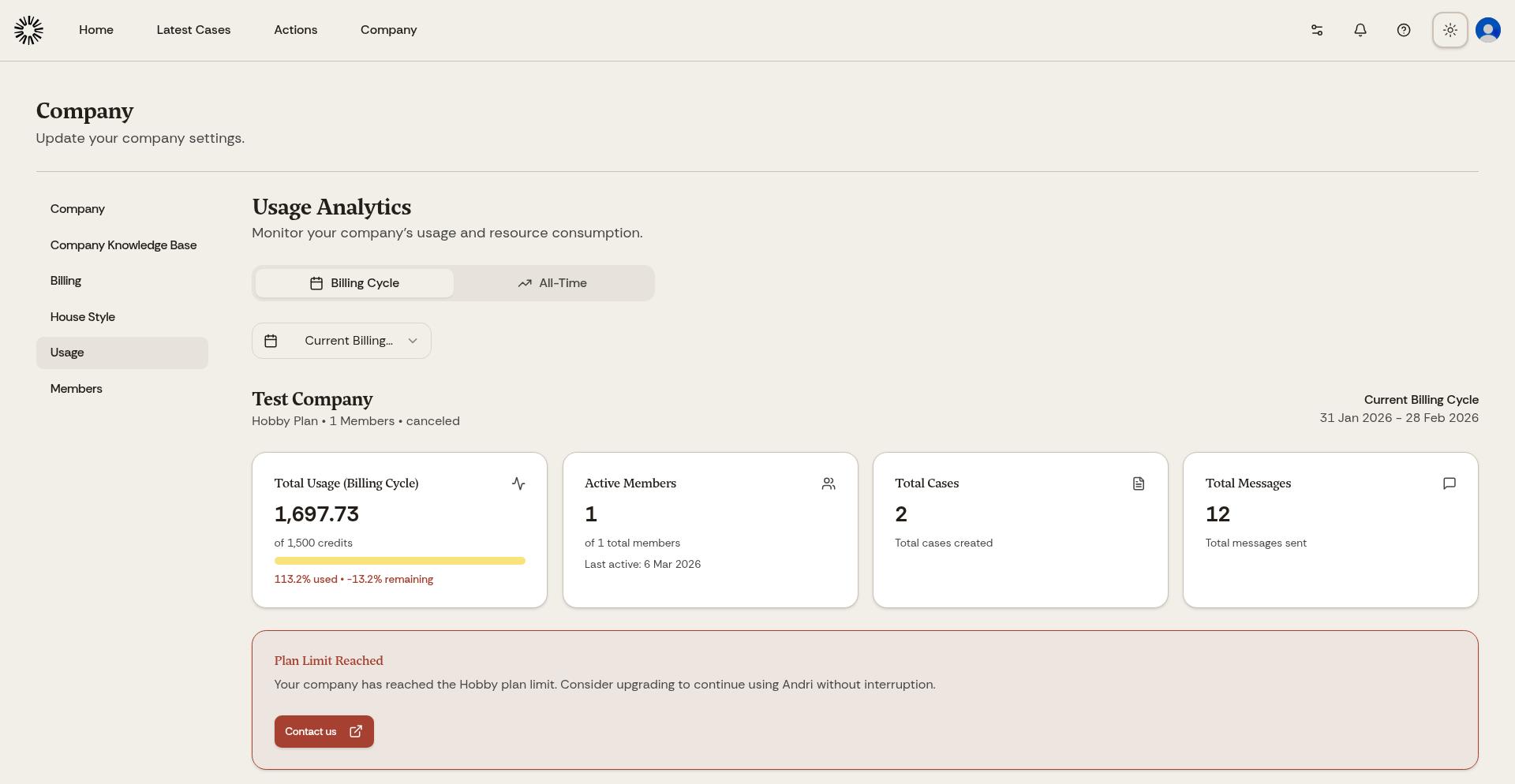
The Usage dashboard displays your firm's credit consumption with charts and breakdowns.
Understanding credit usage
Credits measure the cost of AI work. Every prompt, document analysis, file generation, and AI response consumes credits, and how many credits a request uses depends on the work involved.
Your subscription includes a monthly credit allowance. The Business subscription provides 120,000 credits per month per Admin or Member seat, and a yearly subscription gets the same 120,000 credits per seat per month. The allowance resets on your monthly anniversary and nothing carries over from one month to the next. Support-role members do not receive a seat allowance; they use support credits instead.
In-Depth, Plan and Outcome modes consume more credits but deliver deeper analysis. Fast mode uses fewer credits for quicker results. Choose the mode that matches your task priority.
Usage breakdown by user
The dashboard shows credit consumption per team member. Review this to identify heavy users, understand usage patterns across your firm, spot opportunities for efficiency, and plan subscription adjustments based on actual usage.
Usage breakdown by case
See which cases consumed the most credits. This helps allocate costs to clients, identify particularly complex matters, and understand which types of cases require the most AI assistance.
Usage over time
Charts show daily and monthly credit consumption trends. Monitor these to predict future usage, identify unusual spikes that might indicate errors or inefficient prompting, and plan for seasonal variations in workload.
If your firm regularly runs out of credits, add a billable seat to raise the allowance by another 120,000 credits per month. An admin can also buy credits once the limit is reached.
Storage and case file allowances
The Usage page tracks two capacity limits alongside credits, and both can stop uploads. Your firm gets 100 GB of storage and 10,000 case files for each seat.
When you reach the storage quota, document uploads are blocked until storage is freed or the limit is raised. When you reach the case file limit, you can purchase additional file capacity or contact us for custom pricing.
Optimizing credit usage
To use credits efficiently, start with Fast mode for simple queries and switch to In-Depth, Plan or Outcome mode only when needed. Use @ mentions to focus the AI on specific documents rather than searching your entire knowledge base. Break large requests into smaller, focused prompts. Review and refine prompts to be more specific, reducing unnecessary AI processing.
Running out of credits pauses chat until your next billing cycle or until an admin adds credits. Everything already in Andri stays readable.
Support credits and the Support role
The Credits section on the Billing page shows your firm's support credit balance. Support credits are a prepaid, firm-wide wallet that lets support-role members use chat and create case work product without taking up a seat. They are spent at twice the standard rate and never expire.
While a balance remains, support members can chat and create work product. When the wallet runs out, they can still read existing work but cannot create or edit until an admin tops it up.
Support credits are available on active Business plans, and your firm needs at least one support-role member before you can buy them. Every billable seat (Admin or Member) unlocks one Support seat. Contact us to arrange a custom arrangement.