
Setting up your company and activating a subscription on Andri
Follow these steps to create your Andri account, set up your company profile, and activate your subscription.
Before you begin: Have your company details and payment information ready.
Step 1: Create an account
Go to app.andri.ai
Click on "Sign-Up" and complete the process
Step 2: Set up your company
Click on "Company" in the top menu.
Under "Company Name", enter the name of your firm.
Choose your "Region": Netherlands, Belgium, United Kingdom or Switzerland.
Choose your "Language". Picking a region already sets one for you, and you can change it.
Click "Create Company" to store your changes.
Your region sets your billing currency and cannot be changed later. Firms on the Switzerland region have their matter documents and the content Andri derives from them hosted in Switzerland.
Step 3: Invite your team members
We recommend inviting your team before you subscribe, so your first invoice matches your firm. Seats reconcile automatically as people join: each Admin or Member adds one seat at €350, £300 or CHF 400 per seat per month excluding VAT, depending on your region. Support-role members do not add a seat and instead use support credits.
Before activating your subscription, invite everyone who will be using Andri:
Click on "Members" in the left menu.
Click "Invite Member".
Enter the team member's email address and assign a role (Admin, Member, or Support).
Repeat for each team member you want to invite.
For detailed instructions, see Inviting team members in Andri.
Step 4: Choose a subscription
Business costs €350, £300 or CHF 400 per seat per month excluding VAT, depending on your firm's region. On yearly billing it costs €3,780, £3,240 or CHF 4,000 per seat per year.
Click on "Billing" in the left menu.
Choose "Monthly" or "Yearly" billing.
Select the "Business" subscription.
Click "Subscribe" to activate the subscription.
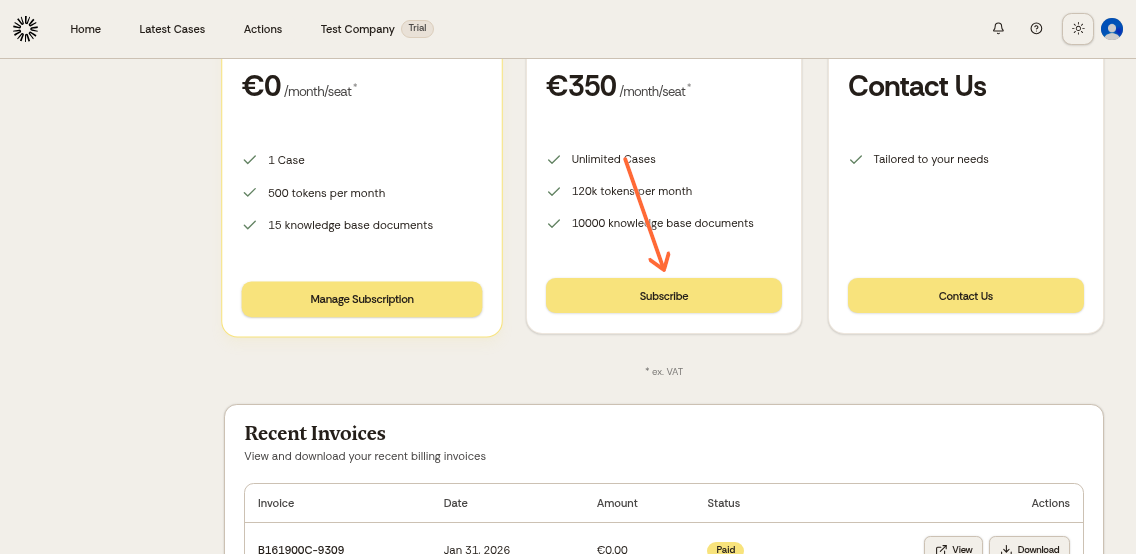
Subscriptions renew automatically. On a monthly Business subscription you can cancel immediately after activating it and keep access until the end of the period. Yearly and promotional subscriptions cannot be cancelled from the Billing page, so contact us before your renewal date. See How do I cancel my subscription? for instructions.
Step 5: Complete payment
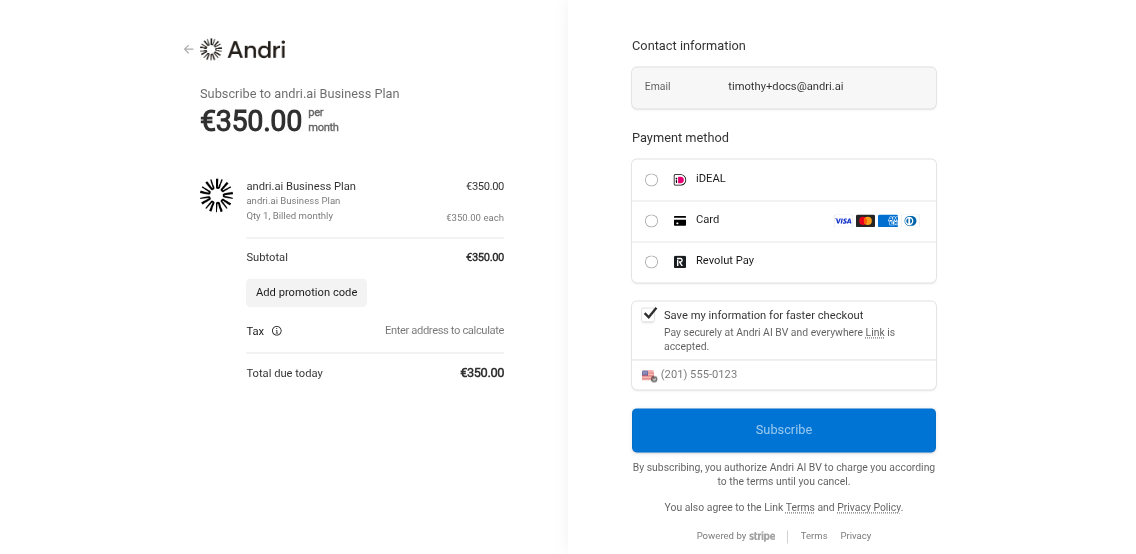
You will be redirected to the checkout page.
Click on "Add promotion code" and enter the discount code you received from the Andri team.
Don't have a promotion code? Contact the Andri team to discuss available discounts for a trial for your organization.
Select a payment method. Firms billed in euros can pay by credit card, iDEAL or Revolut Pay. Firms billed in pounds or Swiss francs pay by credit card.
Click "Pay and subscribe" to finalize the payment.
After completing these steps, your company is set up and your subscription is activated. You can now start building your knowledge base.
If you have any questions or need assistance, please contact Andri support.