
Filling the company knowledge base
The company knowledge base can be filled with all kinds of documents, ranging from press releases to publications you find important. This is your internal knowledge base, for all your team members.
Before you begin: Make sure you have completed your company setup. Gather all the documents you want to make available to your team.
Step 1: Go to your company environment
Click on your company name in the top right corner of the screen. If you have not set up your company profile, do this first.
Step 2: Go to the company knowledge base
Click on "Knowledge base" in the left side menu.
You will now be taken to the page where you can manage your documents.
Step 3: Upload documents
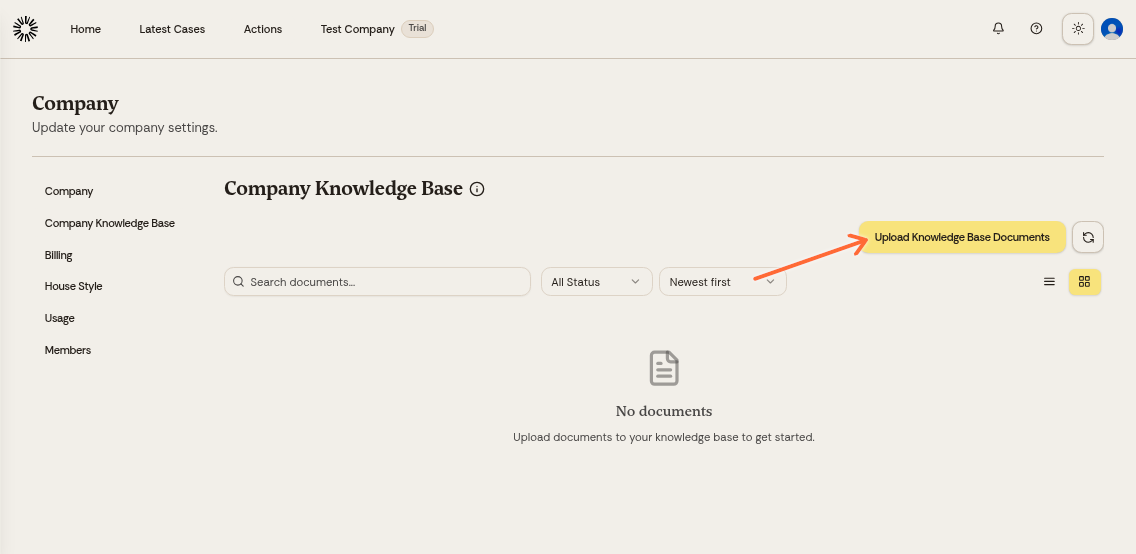
Click on the "Upload Documents" button.
A pop-up will appear where you can select files.
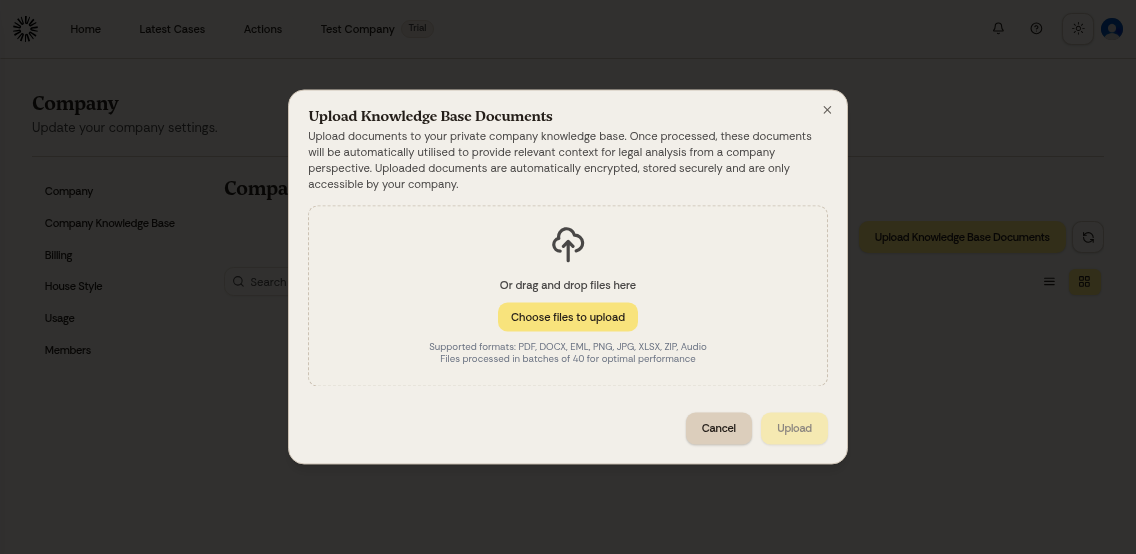
Click on "Choose Files" and select the document you want to upload.
Click on "Upload" to add the document to the knowledge base.
The company knowledge base accepts PDF, Word (DOCX, DOC), PowerPoint (PPTX, PPT), Excel (XLSX, XLS), CSV, XAF, email (EML, MSG), images (PNG, JPG), audio and video (MP3, M4A, WAV, FLAC, AMR, OGG, MP4, WEBM), HTML, Markdown and ZIP archives.
A file can be up to 200 MB, except PDFs at 2 GB and ZIP archives at 1 GB. A case knowledge base takes a slightly wider set of file types, which you can compare in Company knowledge base vs. case knowledge base.
Organize your knowledge base with relevant legal documents, templates, firm policies, research papers, and frequently referenced materials. The more comprehensive your knowledge base, the better Andri can assist with legal analyses.
Uploaded documents can be sorted into folders with their own access levels, so part of the knowledge base can stay limited to administrators.
After uploading, the documents are automatically processed and stored, and are used for legal analyses within Andri. Documents are encrypted and are only available to your firm's members inside Andri; see Safety and security for how access is controlled.