
Setting Up Your Company and Activating a Subscription on Andri
Follow these steps to create your Andri account, set up your company profile, and activate your subscription.
Before you begin: Have your company details and payment information ready.
Step 1: Create an account
Go to app.andri.ai
Click on "Sign-Up" and complete the process
Step 2: Set up your company
Click on "Company" in the top menu.
Under "Company Name", enter the name of your firm.
(Optional) Click "Choose File" to upload a company logo.
Click "Create company" or "Save" to store your changes.
Adding a company logo helps personalize your workspace and makes it easier for team members to identify your organization.
Step 3: Invite your team members
Important: You must invite all team members before purchasing your subscription. Each team member will add a seat to your subscription at €350 per month.
Before activating your subscription, invite everyone who will be using Andri:
Click on "Members" in the left menu.
Click "Invite Member".
Enter the team member's email address and assign a role (Admin or Member).
Repeat for each team member you want to invite.
For detailed instructions, see Inviting Team Members in Andri.
Step 4: Choose a subscription
Click on "Billing" in the left menu.
Select the "Business" subscription at €350 per month per seat.
Click "Subscribe" to activate the subscription.
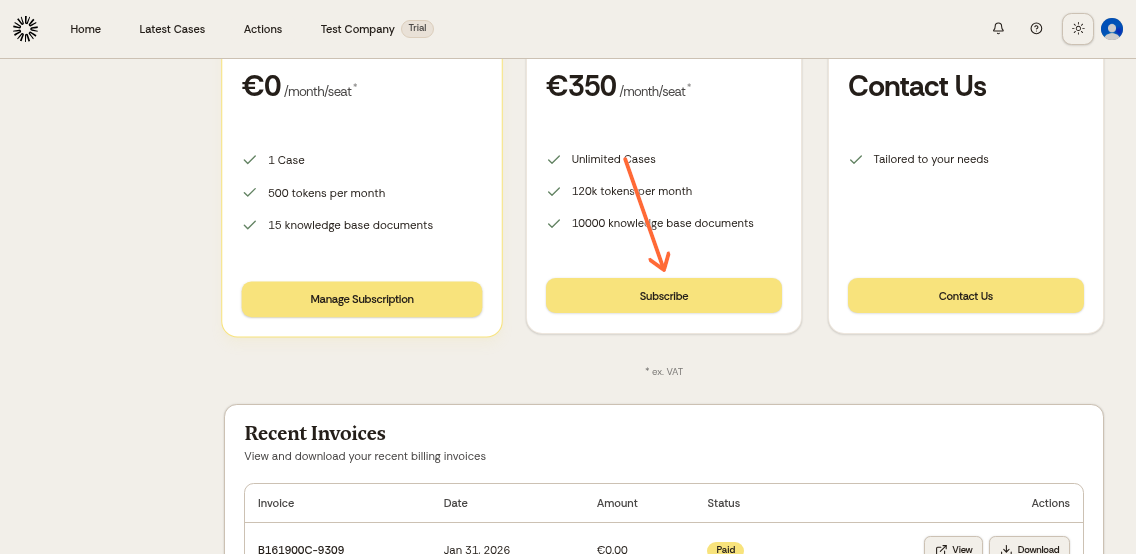
Subscriptions renew automatically. If you're using a trial promotion code and want to test the platform first, you can cancel your subscription immediately after activating it. You'll still have access until the end of your trial period. See How do I cancel my subscription? for instructions.
Step 5: Complete payment
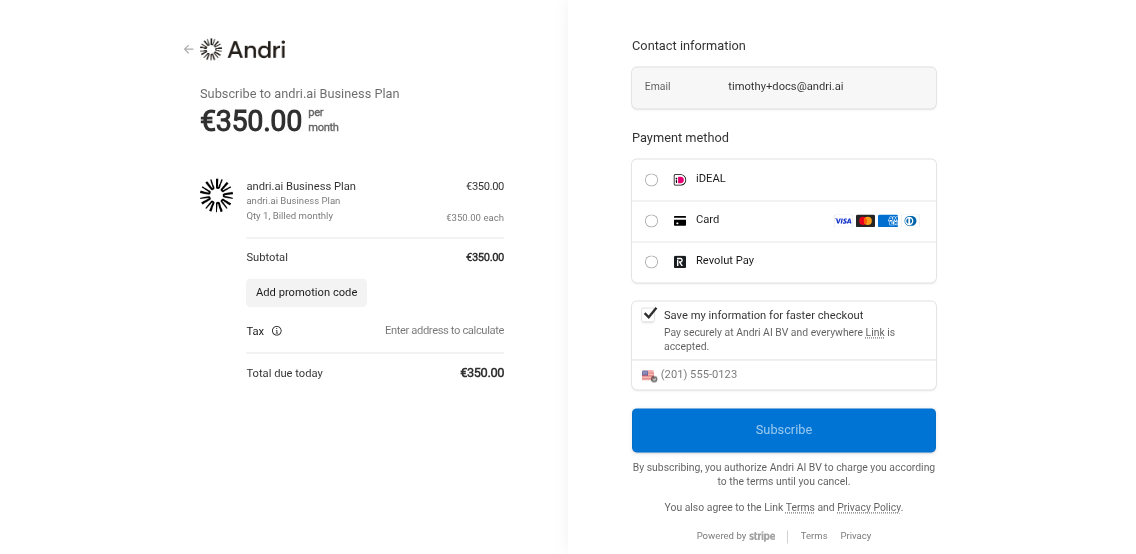
You will be redirected to the checkout page.
Click on "Add promotion code" and enter the discount code you received from the Andri team.
Don't have a promotion code? Contact the Andri team to discuss available discounts for a trial for your organization.
Select a payment method:
iDEAL
Credit card (Visa, Mastercard, etc.)
Revolut Pay
Click "Pay and subscribe" to finalize the payment.
After completing these steps, your company is set up and your subscription is activated. You can now start building your knowledge base.
If you have any questions or need assistance, please contact Andri support.